Compute Groundwater
The Compute (Groundwater Only)  option is only available if the Groundwater Method = Finite Element Analysis (Steady State or Transient) in Project Settings.
The purpose of the Compute (Groundwater Only) option is to allow the user to compute a finite element groundwater seepage analysis, without computing the finite element stress analysis.
For example, you may wish to test various groundwater conditions, or verify that you have setup the groundwater boundary conditions correctly for a model, before you proceed to the stress analysis. You can select Compute (Groundwater Only) and view the groundwater results in RS2 Interpret, without computing the stress analysis.
This can be particularly useful for complex, staged models, where the compute time may be significant, and it is necessary to verify the groundwater results before proceeding to the stress analysis. It can also be used if you are only analyzing a groundwater model, and do not require stress analysis results.
The Compute (Groundwater Only) option is available in the toolbar or the Groundwater menu. It will only be enabled when the finite element mesh is generated.
Compute (Groundwater Only) Options
Groundwater computation can be performed from either a defined recovery stage or the first stage of the model. Expand the dropdown arrow to see options. If you select the Compute Groundwater  icon from the toolbar, Compute from selected recovery stage will be executed.
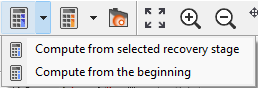
Compute from selected recovery stage
This option resumes the groundwater computation from the selected recovery stage. The recovery stage is defined in Recovery Options section under Stages tab in Project Settings dialog.
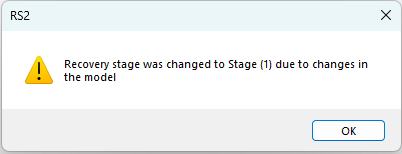
If the selected recovery stage is no longer available due to model setting or changes, the program will trace back to the nearest available stage up to the beginning. If the recovery stage changes, a notification will inform you at saving before compute, as below.
See more information about Compute Recovery from the topic.
Compute from the beginning
This option starts groundwater computation from the beginning of the model. Any previous computed data will be replaced.
was previously aborted and recovery files exist, you can resume groundwater only computation. However, if you choose to compute both groundwater and stress analysis together  , the computation will start from the beginning and existed recovery files will not be used.
 Compute Groundwater and Stress Analysis
It should be noted that the groundwater seepage analysis is automatically computed when you select the main Compute  option in RS2. That is, whenever you compute a stress analysis with RS2, the groundwater seepage analysis will automatically be computed before the stress analysis. The Compute (Groundwater Only) option does NOT have to be selected. It is entirely optional, and is available for the purpose described above.