Terzaghi Weighting
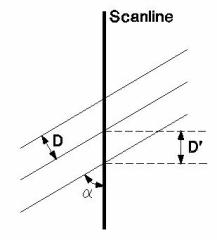
When orientation measurements are made, a bias is introduced in favour of those features which are perpendicular to the direction of surveying. To illustrate this concept, three joints of identical spacing along a scanline are shown below.
Terzaghi Weighting
Measurements along the scanline record many more joints in Set A than in Set C, which will bias the density contour plot heavily in favour of Set A. To compensate for this bias, a geometrical weighting factor is calculated and applied to each feature measured. This weighting, W, can be applied to contour and rosette plots in DIPS, and is also used in the weighted mean vector calculations. The bias correction should only be used for planar features, and will not account properly for measurement bias in linear features such as acicular crystal fabric.
The geometric weighting factor, W, is calculated as follows:
where:
- α = minimum angle between plane and Traverse
- D’ = apparent spacing along Traverse
- D = D’ sin a = D’ (1/W) = true spacing of discontinuity set
- R’ = 1/D = 1/D’ sin a = D’ cosec a = true density of joint population
- W = (1) cosec a = weighting applied to individual pole before density calculation
Since the weighting function tends to infinity as alpha (a) approaches zero, a maximum limit for this weighting must be set to prevent unreasonable results. This maximum limit corresponds to a minimum angle, which can be between 1° and 89.9°. However, the recommended range is limited to 5° to 25°, and the default is set to 15°. The user can change this limit with the Minimum Bias Angle option (see below).
The effect of applying the Terzaghi Weighting to some data distributions can be quite severe. If you use weighted data plots for design or interpretation, be sure you understand the weighting procedure.
The results of applying the weighting procedure to a sample data file are shown in the following figure. In this case, there is a very important subnormal group of joints, which is masked by abundant structural data collected on horizontal scanlines. In this case, the heavy bias introduced by the horizontal data can be removed by weighting the data.
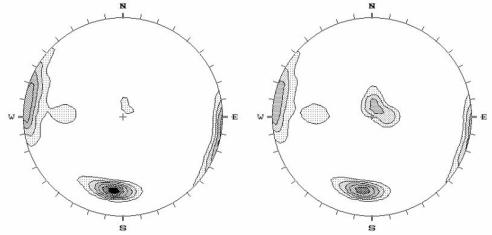
The Terzaghi Weighting only affects the apparent quantity of poles and does not change the location of the poles, which represent your raw data.
The computed Weight is shown in the Weight column of the Pole Data Grid.