Declination
The Declination in the Orientation Data dialog can be used for azimuth correction. This is typically used to correct for magnetic declination, but can be used to adjust to grid north.
If you have already adjusted your measurements with your compass, then leave the default value of 0 (zero) declination, since additional correction is not required.
NOTE: The declination is ADDED to all azimuth values, so use:
- A POSITIVE value to correct for EAST declination
- A NEGATIVE value to correct for WEST declination
For example, a Declination of –7 indicates a declination of 7 degrees WEST
The figures below illustrate the definition of east and west declination. Note that the east/west terminology refers to the offset of the original (unadjusted) azimuth, WITH RESPECT TO the final (adjusted) azimuth (i.e. either true north or grid north).
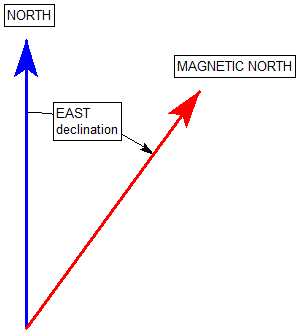
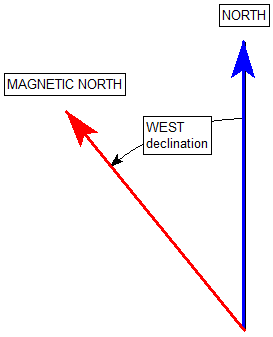
In any case, always remember that the declination value you enter in the Orientation Data dialog is ADDED to all azimuth values. So enter the declination value accordingly (positive or negative) to achieve the desired correction to true north or grid north.
Declination for Borehole Oriented Core Traverse Type
If you are using Borehole Oriented Core Traverses, and if borehole trends (azimuths) are taken from grid north, you must use ZERO Declination. The Declination, if non-zero, will be applied to the borehole trends (azimuths). In the Orientation Data dialog, this is:
- The Orient 3 value for Linear Borehole Oriented Core (Traverse tab)
- The Trend values for Curved Borehole Oriented Core (Survey Data tab)
Declination for Clinorule Traverse Type
If you are using Clinorule Traverses, and if clinorule drift orientations (reference lines) are taken from grid north, you must use ZERO Declination.