Structure Set
Structure Measurements (Orientations, Traces, Discontinuities,…) are grouped in so-called Structure Sets, which are shown within the Structure List.
Properties
General information to each Structure Set is displayed in the Properties pane which is opened in the context menu with “Show Properties” or by a click on “Windows | Properties” in the menu bar. The pane comprises the name of the active Structure Set which is editable in order to provide a descriptive name. Structures in the selected set are excluded (locked) for further clustering by enabling the corresponding checkbox “Locked (when clustering).”
Statistics
The statistics provides the mean orientation vector (dip direction and dip angle) of the Structure Set. The vector is the sum of all Orientation measurements contained in the Structure Set and divided by the number of measurements. This calculation assumes equal weights for each measurement and neglects the large Traces may have more impact on the mean set orientation than small Traces. The Analyst allows to enable weights for each measurements. The weights are related to the maximum diameter of the structure. In consequence, large structures have more impact on the mean set orientation than small structures. The mean orientation vector of a Structure Set is then the sum of all weighted Orientation measurements contained in the Structure Set. “Weight Orientations by Size” is enabled with the corresponding checkbox.
Annotations
The pane provides the complete set of Annotations Elements i.e. Orientations, Traces, Areas, Bridges and Discontinuity Models (active annotations / total number of annotations) of the active Structure Set.
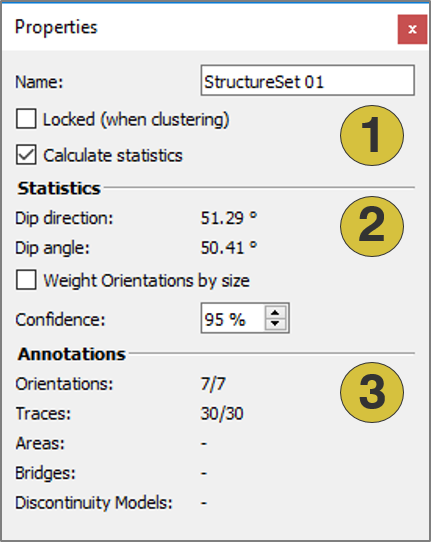
- Settings
- Statistics
- Annotation Elements
Adding a Structure Set
A new Structure Set is added to the Structure List by clicking “Add Structure Set”  icon in the toolbar of the Structure tab of the Mapping pane.
Context menu
- Set Colour
Defines a new colour for Structure Set - Delete
Deletes the Structure Set - Set active
Activates (shows) and deactivates (hides) selected items - Show Properties
Opens the Properties pane for the Structure Set - Export
- Export Structural-Geologic Data as CSV - Exports the structures of the set as “.csv” file
- Export as DXF - Exports the structures of the set as ”.dxf” file
- Export as VRML - Exports the structures of the set as ”.vrml” file
- New Structure Set
Adds an new Structure Set