Management of Lists
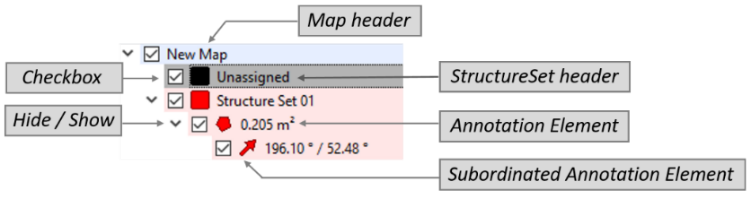
Annotation Elements are listed in tab-specific lists i.e. Structure List and individual list for Volumes, Tapes, Measuring Points, Profiles, Sections, etc. Per default, the checkbox on the left of an item is selected – i.e. the item is active and shown in the 3D viewer. When the checkbox is unselected, the element is deactivated (i.e. not involved in analysis) and hidden in the 3D viewer. Selecting the checkbox activates and shows the element again. By clicking the “Hide/Show” button the subordinated entries are hidden or shown. The left hand side of the list entry is shaded according to the selected colour for the Structure Set/Annotation Element. Analogue to the Structure Sets all other lists are managed in the same manner.