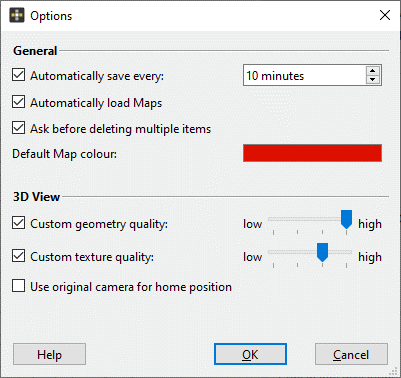
General Options
The Options dialog of the Analyst is called via the menu “Edit | Options”. It comprises the following features:
- General
- Automatically save every xx minutes
Security feature that automatically saves the “.jms” file”. Automatic saving intervals in minutes can be chosen by the user. - Automatically load Maps
Activates/deactivates the automatic loading of corresponding Maps (“.jms” file”) after loading a 3D Model. Note, the Map has to have the same file name as the 3D model. - Ask before deleting multiple items
Security measure: The user is asked before deleting multiple selected items. Disabling deactivate the security measure; selected items are deleted immediately without any warning. - Default Map colour
Defines the default colour of Structure Sets.
- Automatically save every xx minutes
- 3D View
Custom geometry quality
Changes the geometry reproduction on the screen from low to high, i.e. it changes the mean point spacing of the mesh. Note, enabling effects the geometry quality in the Analyst software only. If the features is disabled, the texture quality is defined in the general settings (Center Window Settings).The current geometric reproduction (3D points and triangle) and the corresponding mean point spacing can be accessed via the user interface- Custom texture quality
Changes the level of detail of the texture rendering on the screen form low to high. Note, enabling effects the texture quality in the Analyst software only. If the features is disabled, the texture quality is defined in the general settings (Center Window Settings). - Use original camera for home position
Displays the 3D model in the viewer’s home position from its original camera position.