Non-Punctual Occurrence
The feature Non-punctual Occurrence allows one to map an event on the 3D model by a polygon. Procedure:
- Click on the “Non-punctual Occurrence”
 icon in the toolbar of the Occurrences tab or use the shortcut key “N”
 - Mark the Non-punctual Occurrence on the 3D model by clicking the left mouse button. A polygonal line is growing instantaneously. Undo the last action by pressing the right mouse button (multiple uses possible).
- Finish the Non-punctual Occurrence and continue the mapping by pressing the “Space” key or finish the Non-punctual Occurrence by clicking “Enter” or by clicking the “Non-punctual Occurrence” icon.
Edit the Non-punctual Occurrence measurement by a double click with the right mouse button on the item:
- Add a point by clicking the right mouse button
- Insert a point by holding “Ctrl” and clicking the right mouse button
- Delete a point by holding “Alt” and clicking the right mouse button
- Move a point by holding “Shift” and clicking the right mouse button
The Properties pane for Non-Punctual Occurrences is activated in the context menu with “Show Properties” or by a click on “Windows | Properties” in the menu bar. The properties are displayed with a click in the corresponding entry in the Occurrences tab. The name of the Non-Punctual Occurrence can be edited in order to use an intuitive name or for more detailed descriptions. Customized notes can be added to individual Non-Punctual Occurrences in the Notes tab.
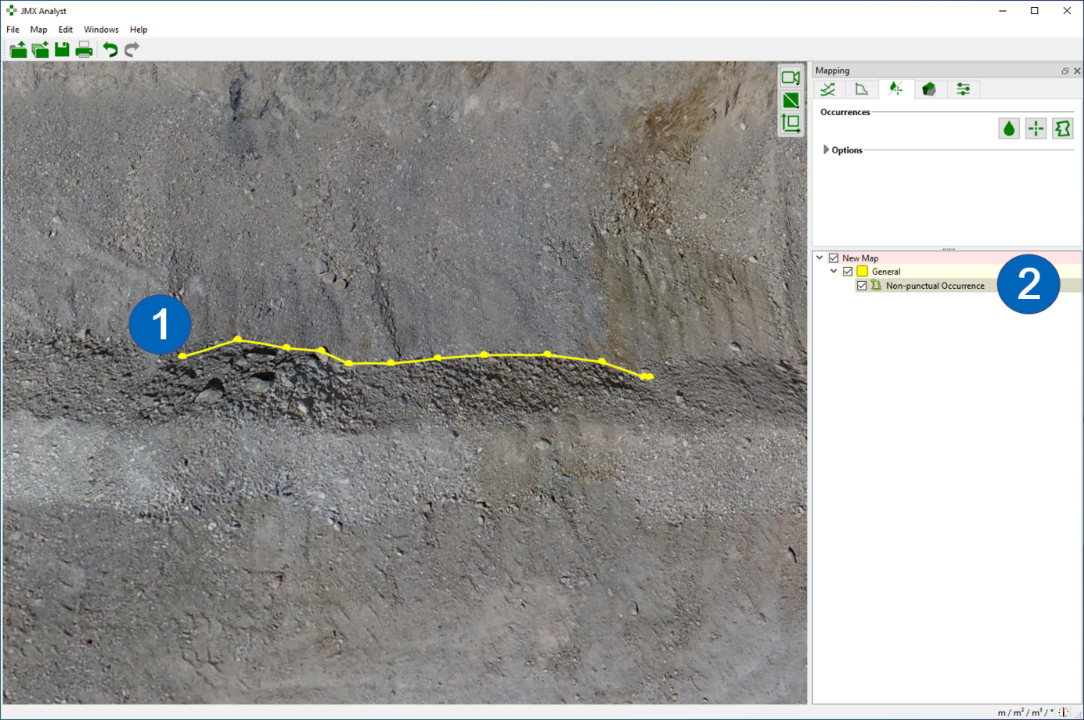
- Polygon of the Non-punctual Occurrence
- Non-punctual Occurrence in the Occurrences tab
Context menu
- Edit
Add a point by clicking the right mouse button. Insert a point by holding “Ctrl” and clicking the right mouse button. Delete a point by holding “Alt” and clicking the right mouse button. Move a point by holding “Shift” and clicking the right mouse button - Set Colour
Defines a new colour for the Non-punctual Occurrence - Active
Activates (shows) and deactivates (hides) the selected item - Look at
Centers the occurrence in the 3D viewer - Look at and Zoom
Centers and zoom the occurrence in the 3D viewer - Delete
Deletes the selected Non-punctual Occurrence - Show properties
Opens the Properties pane for the Non-punctual Occurrence - Export
- Export as DXF - Exports the measurement as ”.dxf” file
- Export as VRML - Exports the measurement as ”.vrml” file