Context menu of Annotation Elements
The context menu of individual Annotation Elements is called by selecting the desired item followed by a click on the right mouse button. Every Annotation Element has its own context menu according to its features. The same context menu also comes up in the 3D viewer selecting an Annotation Element with the left mouse button and pressing then the right mouse button. The context menus of the individual Annotation Elements are described at the corresponding chapters in this manual.
Context menu of multiple items
The context menu of multiple selected items comprises following features:
- Set active
Activates (shows) and deactivates (hides) selected items - Set colour
Defines a new colour for selected items - Delete
Deletes selected items - Move to
Moves the selected items to another Structure Set - Export
Offers available export possibilities for selected items
“Set active” allows the user to hide or show the selected elements at once. In addition, the visualization of Annotation Elements can be controlled by filtering the length (Traces) or size (Areas) respectively.
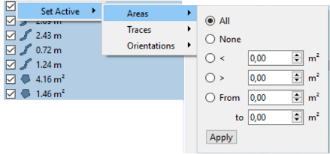
The multiple selection of items is proceeded as follows:
- Move the mouse cursor over the desired entries with the left mouse button clicked
- Perform individual clicks with the left mouse button while the “Shift” key is pressed
- Click with the mouse on an individual dataset and move the “Move Down” or “Move up” cursor on the keyboard while the “Shift” key is pressed