Export 3D Model
Export settings for each file format are defined in the respective export dialogs. Following options are available:
- OBJ - “File | Export 3D Model | Export as OBJ”: Exports an “.obj” file. The number of exported model points and the texture resolution can be specified.
- DXF - “File | Export 3D Model | Export as DXF”: Writes a “.dxf” file of the triangulation of the 3D model. The number of exported model points can be specified.
- VRML - “File | Export 3D Model | Export as VRML”: Writes a “.vrml” file of the 3D model including points and triangulation. The texture is exported as separate bitmap file or can be embed in the exported file (enable “Embed texture”). The number of exported model points can be specified. When exporting the 3D model, the structural mapping can optionally be included by enabling the “Include Texture” checkbox.
- CSV - “File | Export 3D Model | Export as CSV”: Writes an ASCII comma separated value file (“.csv”) of the co-ordinates of the point cloud. The number of exported model points and the separator can be specified. If colours are available, they can also be exported by enabling the “With Colours” checkbox.
A reduced point count is only supported for “.obj” exports without textures. When textures are included, the target point count may not be maintained.
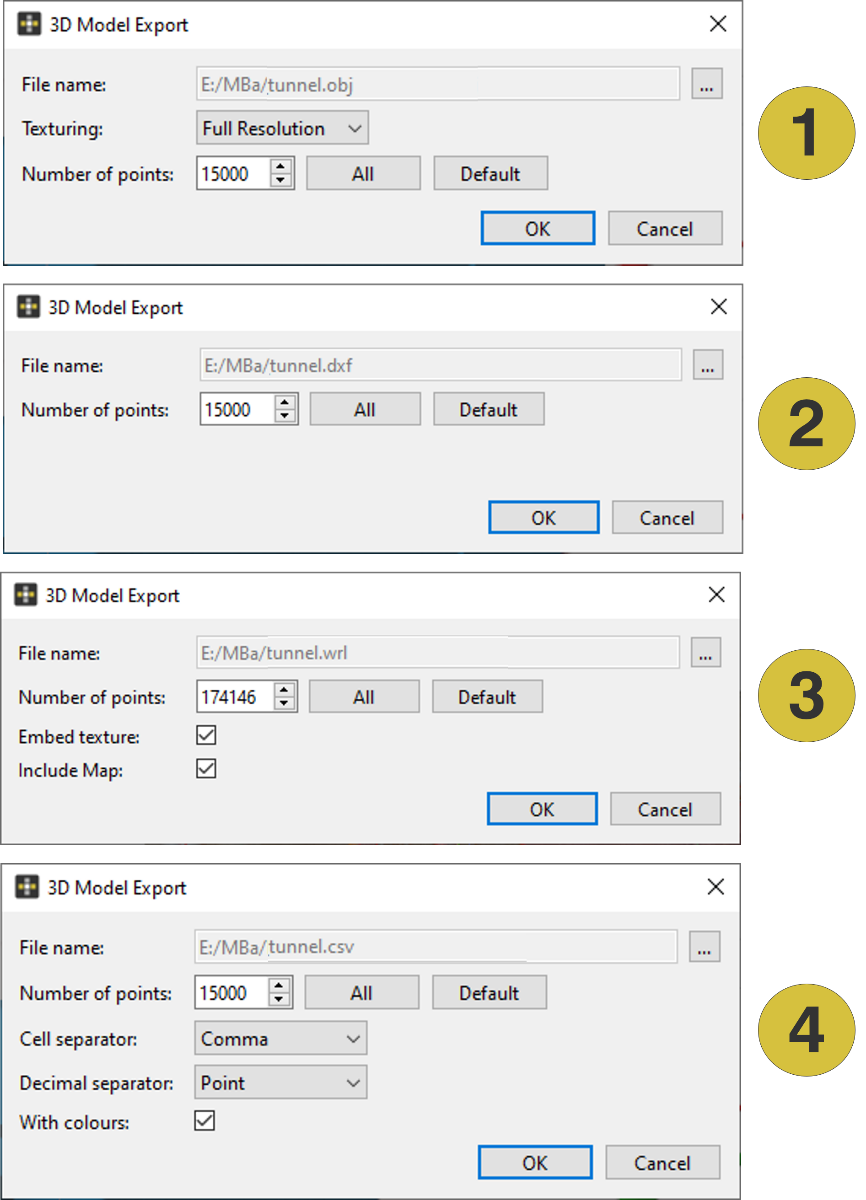
- Export dialog for “.obj”
- Export dialog for “.dxf”
- Export dialog for “.vrml”
- Export dialog for “.csv”