Undrained
For the Undrained soil model, the friction angle phi is automatically set to zero. The shear strength is defined only by the cohesion of the material. Three sub-options for defining the Undrained cohesion are available, by selecting from the Cohesion Type drop-down list:
Constant
Cohesion is constant throughout the material.
F(Depth from Top of Layer)
Cohesion is a function of depth, where depth is measured from the top of the material layer that is local to the slice, to the center of a slice base.

- Cohesion (Top) is the Cohesion at the top of the material layer.
- Cohesion Change is the rate of change of Cohesion with depth.
- If you wish to specify a maximum soil strength, select the Cutoff checkbox and enter a maximum value for Cohesion. If the rate of Cohesion Change is negative, then this value represents the minimum soil strength.
F(Depth from Horizontal Datum)
Cohesion is a function of depth, where depth is measured from a user-specified Datum (y-coordinate) to the center of a slice base.

- Cohesion (Datum) is the Cohesion at the Datum elevation.
- Cohesion Change is the rate of change of Cohesion with distance (ydatum-y) from the Datum. If the Cohesion Change is positive, then cohesion increases below the datum and decreases above the datum, according to the change in elevation ydatum-y.
- If you wish to specify a maximum soil strength, select the Cutoff checkbox and enter a maximum value for Cohesion. If the rate of Cohesion Change is negative, then this value represents the minimum soil strength.
- Datum is the datum elevation (y-coordinate).
F(Distance to Slope)
Cohesion is a function of depth, where depth is measured from the closest point on the slope (actual distance) to the center of a slice base as shown below.
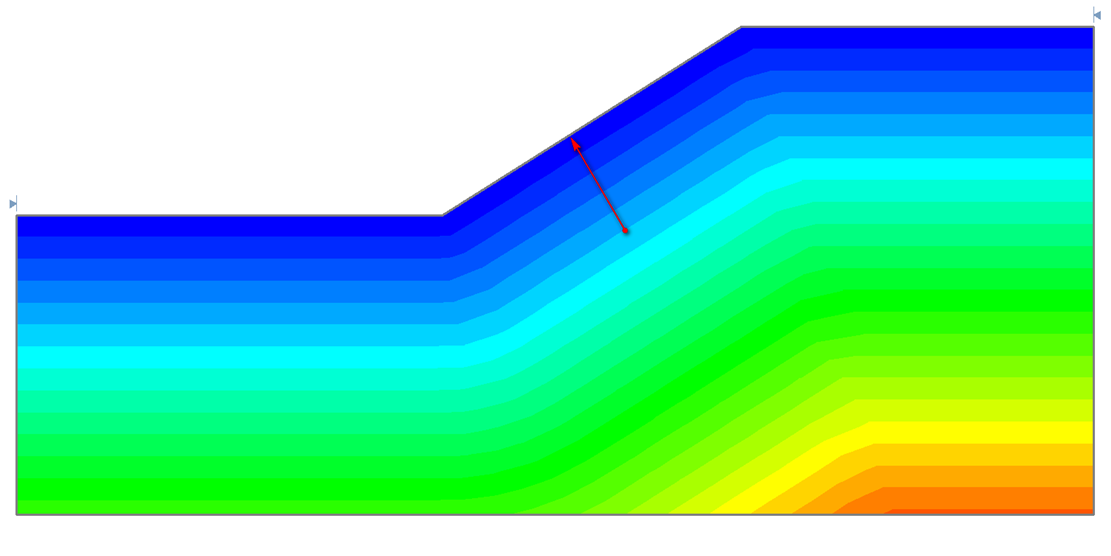
- Cohesion (Top) is the Cohesion at the top (closest point on the slope) of the slope to the center of a slice base.
- Cohesion Change is the rate of change of Cohesion with depth.
- If you wish to specify a maximum soil strength, select the Cutoff checkbox and enter a maximum value for Cohesion. If the rate of Cohesion Change is negative, then this value represents the minimum soil strength.
Note that the Water Parameters are automatically disabled in the Define Materials dialog when Strength Type = Undrained, since pore water pressure is not required.