RSPile
The RSPile support type in Slide2 works in conjunction with the Rocscience pile analysis program RSPile.
- Pile properties are defined in the RSPile program, which computes the mobilized lateral and/or axial resistance along the length of a pile, for a given soil geometry and loading conditions.
- The pile support force used in the Slide2 analysis is then determined by the location and angle of the slip surface intersection with the pile.
For a detailed example see the tutorial Analyzing Pile Resistance using RSPile. For information about RSPile click here.
RSPile File
If you have already defined properties and saved an RSPile file, then you can read in this file by selecting the Choose file  option.
If you are defining a new RSPile file, then select the Run the RSPile Utility  option, to enter the pile and soil properties and save the file.
For detailed instructions see the tutorial Analyzing Pile Resistance using RSPile.
Out of Plane Spacing
The spacing between soil nails in the out-of-plane direction (i.e. along the slope), measured from center to center.
Soil Displacement
The Soil Displacement is the allowable soil displacement along a slip surface at the point of intersection with a pile.
- Maximum - this allows you to enter a maximum (limiting) value of soil displacement
- Ultimate - in this case, RSPile iterates to find the maximum soil displacement that results in yielding of the pile
Angle Divisions Method
As of Slide2 v9,043, a new checkbox has been added to the RSPile support type titled “Use Angle Divisions”. When this option is enabled, the RSPile support will be analyzed using variations in the angle of the slice base instead of variations in displacement. The axial and shear forces are based on the pile response to horizontal and vertical soil displacement applied according to the slice base angle. This provides a closer representation of the actual slip surface geometry at the point where the pile intersects the slice.
Note
- This option is only available when using RSPile version 3.033 or higher. If this option is checked and the version is less than 3.033, the non-angle discretization method will be used. Various fixes and improvements have also been added in this version but are not necessarily related to the angle division approach.
- RSPile will perform calculations in using the Axially/Laterally Loaded analysis type. Ensure the Pile Analysis type is set to this type in the RSPile file.
- Both the maximum and ultimate displacement options support this angle approach but may vary compared to the original method depending on the model and parameters
Force Application
For RSPile support, the default method of Force Application = Active. See the Force Application topic for a discussion of the significance of Active and Passive support force application in Slide2.
Axial and Lateral Analysis
Within the RSPile project settings, there are options to specify whether the pile will be considered to be Axially Loaded, Laterally Loaded, or Axially / Laterally Loaded.
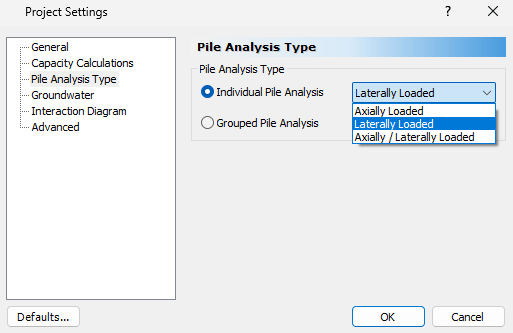
If the pile is axially loaded, then the axial component of the soil displacement will be applied to the pile, and the axial reaction is applied onto the slip surface.
If the pile is laterally loaded, then the lateral component of the soil displacement will be applied along either the X’ and Y’ axis of the pile. The Lateral Shear Direction can be selected in Slide2 as either Along X’ in RSPile or Along Y’ in RSPile.
For the purposes of the integration with Slide2, RSPile will always produce the axial and lateral response of the pile. If the original RSPile file is a non-combined analysis mode (axial only or lateral only), there are assumptions made to facilitate this analysis and generate results, such as using a default axial or lateral material for the analysis. In general, it is recommended to use the Axially/Laterally Loaded analysis type.
Batter and Ground Slope Modifiers
For certain materials, the batter angle and ground slope at the surface near the pile in the direction of slippage affect the ultimate soil resistance (see Laterally Loaded Piles Theory Manual in the RSPile documentation) calculated in RSPile.
Three options are provided in Slide2 to account for these angles:
- Apply Batter and Ground Slope Modifiers: If toggled OFF, beta (90 degrees – batter angle), groundslope, and alpha angles will be ignored during calculations of ultimate soil resistance. Note that this can lead to an unconservative analysis in some cases. If toggled ON, then one of the following two options must be selected.
- Calculate from Slide2 model: the pile batter and ground slope angles that you have defined in the Slide2 model will be adopted during the calculation of the ultimate soil resistance.
- Use RSPile file values: the pile batter and ground slope angles in the RSPile file that you have selected will be adopted during the calculation of the ultimate soil resistance.
Orientation
The lateral shear direction determines which pile shear response is used to calculate the pile resistance. If Along X′ in RSPile is selected, the pile shear response along the X′ axis will be used. In this case, the applied soil displacement will be assigned in the global X direction. Likewise, selecting Along Y′ in RSPile will use the pile shear response along the Y′ axis, and the applied soil displacement will be assigned in the global Y direction.
Note:
If the pile's local axes are not aligned with the global axes, the displacement will not be applied directly along the selected local axis which may cause confusion in the results.
If the pile is rotated about its Z′ axis such that X′ aligns with the global Y direction and Y′ aligns with the global X direction, and the lateral shear direction is set to Y′, the soil displacement will still be applied in the global Y direction. Since Y′ is aligned with the global X direction in this orientation, the applied global Y displacement will not generate a valid shear contribution from Y′. In this case, the pile should be rotated in RSPile so that the selected local shear direction aligns with the intended global displacement direction.
As of RSPile v3.033, the response is no longer taken as the maximum response of both local axis. To maintain accuracy, only the selected local axis response will be utilized. Ensure the piles are oriented in the desired orientation about the Z’ axis.