Damping Formulation
Viscous/Small-Strain Damping in the Lumped Mass solver
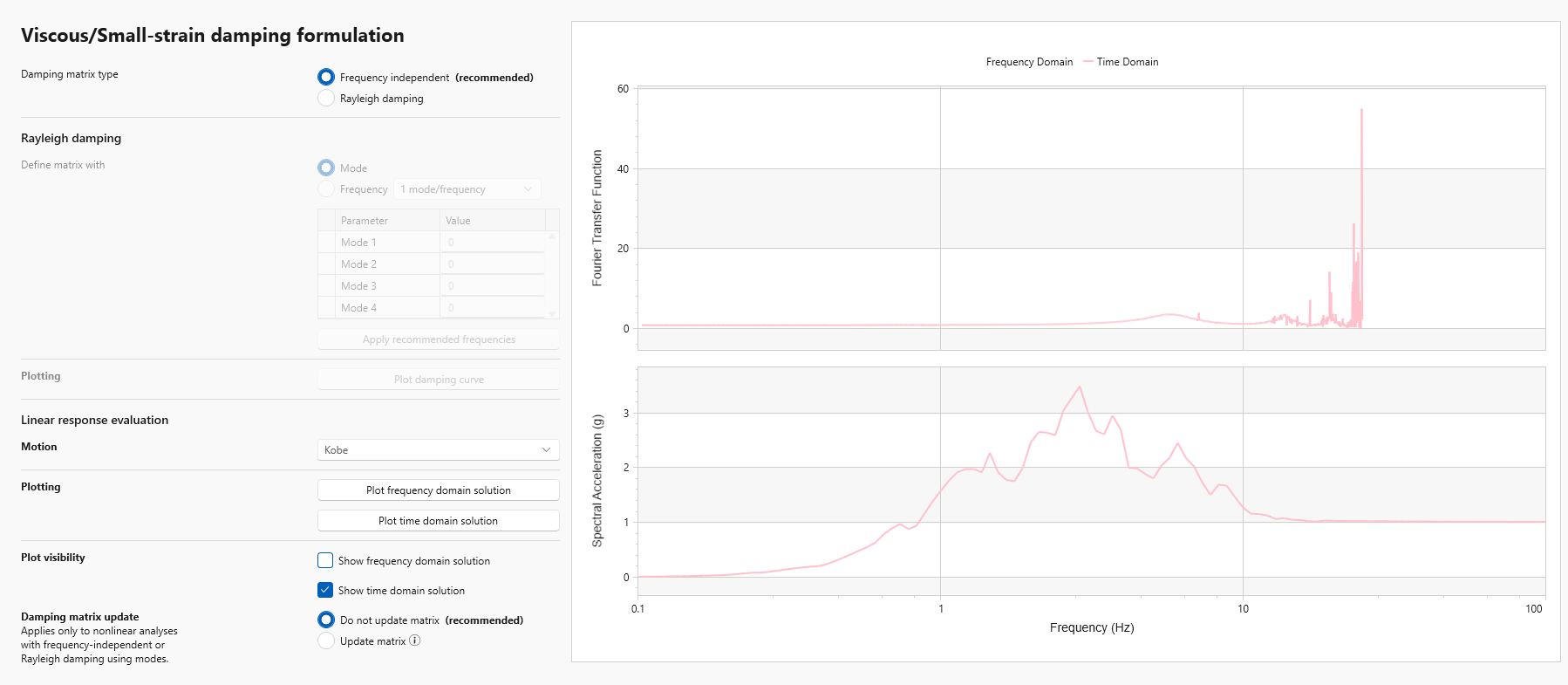
The Viscous/Small-Strain Damping Formulation step appears only for time domain analyses (Linear or Nonlinear) and allows the user to set the viscous damping formulation and select the optimum modes/frequencies for the analysis.
Viscous damping formulation is used to model small strain damping. The viscous damping formulation results in frequency dependent damping and can introduce significant artificial damping. It is therefore important to select an appropriate viscous damping formulation and corresponding coefficients to reduce the numerical damping (Hashash and Park, 2002; Park and Hashash, 2004). There are three types of Rayleigh damping formulations in RSSeismic, as listed below. It is, however, recommended that the frequency independent damping formulation be selected for most analyses.
Damping Formulation Inputs
The inputs in the Damping Formulation tab help control the introduction of numerical damping through frequency dependent nature of the viscous damping formulation.
The following options must be specified:
- Damping Matrix Type:
- Frequency Independent (recommended)
- Rayleigh Damping
- 1 mode/freq.
- 2 modes/freq. (Rayleigh)
- 4 modes/freq. (Extended Rayleigh)
- Damping Matrix Update:
- Do not update matrix (recommended)
- Update matrix
In addition to the required options, there are several optional functions available to the user:
- The Plot Damping Curve option can be used to generate a plot of the Normalized Damping Ratio. This option is available only when the Rayleigh Damping option is activated.
- The user can choose whether the damping matrix will be recalculated at each step of the analysis or not in the Damping Matrix Update section.
- The user can plot the Frequency Domain Solution and the Time Domain Solution for their motion of choice using the Plotting options.
Frequency Independent Damping Formulation
This procedure solves for the eigenvalues and eigenvectors of the damping matrix and requires no specification of modes or frequencies. This formulation removes many of the limitations of Rayleigh Damping and does not greatly increase the required analysis time in most situations. A complete explanation of the damping formulation is presented in Phillips and Hashash, 2009.
Rayleigh Damping formulation types
- Simplified Rayleigh Damping formulation (1 mode/frequency)
Uses one mode/frequency to define viscous damping. - Full Rayleigh Damping formulation (2 modes/frequencies)
Uses two modes/frequencies to define viscous damping. - Extended Rayleigh Damping formulation (4 modes)
Uses four modes/frequencies to define viscous damping.
A complete explanation of the extended Rayleigh damping formulation is presented in Park and Hashash, 2004.
Modes/frequencies selection
There are two options available for selecting modes. The first option is choosing the natural modes (e.g. 1st and 2nd modes). The second option is choosing the frequencies for Rayleigh damping directly. The resulting Rayleigh damping curve can be displayed by pressing Plot Damping Curve. Note again that the viscous damping is frequency dependent. The goal in time domain analysis is to make the viscous damping as constant as possible at significant frequencies.
Verification of the selected modes/frequencies
The time domain solution uses the frequency dependent Rayleigh damping formulation, whereas actual viscous damping of soils is known to be fairly frequency independent. The frequency domain solution uses frequency independent viscous damping. The appropriateness of the chosen modes/frequencies should be therefore verified with the linear frequency domain solution.
The results of the linear frequency domain solution (Frequency ratio vs. Freq. and Response spectrum plots) will be displayed as blue curves. The goal is to choose the appropriate modes/frequencies that compare well with the linear frequency domain solution.
Enter the desired modes/frequencies as input and click Plot time domain solution. The results (in the same chart as frequency domain solution) will be displayed as pink curves. Choose the modes/frequencies that agree well with the linear frequency domain solution. This is an iterative procedure and optimum modes/frequencies should be chosen by trial and error.
Damping Matrix Update
This option is only applicable for nonlinear solutions. During the excitation, soil stiffness and the frequencies corresponding to the natural modes of the profile change at each time step. The natural modes selected are recalculated at each time step to incorporate the change in stiffness and the damping matrix is recalculated.
This feature is enabled by clicking the Update Matrix option in the Damping Matrix Update selection. Note that using this feature may significantly increase the time required to complete an analysis.
Viscous/Small-Strain Damping in the Finite Elements solver
For the Finite Elements solver, RSSeismic implements the frequency-range damping model proposed by Huang, Sturt, and Willford (2019). The model provides an approximately uniform damping ratio over a user-specified frequency range and is suitable for nonlinear time-domain analyses in which modal damping cannot be applied. Unlike Rayleigh damping, the damping ratio does not vary strongly with frequency within the specified range and no mass-proportional damping is applied to rigid-body motion. More details of the implementation can be found at frequency-independent damping paper.
In RSSeismic, the number of filters and their weighting coefficients are calculated automatically for each material. The solver begins with two filters and increases the number, up to a maximum of 30, until the maximum difference from the target damping factor over the specified frequency range is no greater than 5%. The filter equations are integrated using the backward-Euler method at every mechanical time step.
The damping model requires three user-defined parameters for each material:
- The target damping ratio, ξ
- The lower frequency bound, f1
- The upper frequency bound, f2
RSSeismic selects a lower frequency bound of 0.1 Hz and an upper frequency bound of 30 Hz. The model provides approximately uniform damping only within this range; the damping decreases progressively outside it. Moreover, the target damping ratio is selected from the soil model properties.