Export
The Particle Size Distribution Plot and the corresponding parameters are exported to “.csv” and “.pdf” by clicking “File | Export Plot as CSV” and “File | Export Plot as PDF” in the menu bar or by clicking the corresponding buttons in the Plot pane (see Features | Plot Pane). The full set of data (see Features | Data pane) is exported by clicking “File | Export Data as CSV” in the menu bar or by clicking the corresponding button in the Data pane. The “csv” export can be configured by the user.
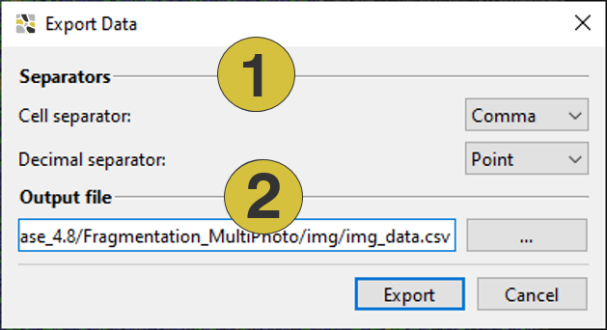
- Type of separator
- Folder and name
Example “Export Plot as CSV”:
"Geometry resolution [ m/px]";0,005320070629
"Median Point Spacing [m]"; 0,032237317413
"x20 [m]";0,188889413461
"x50 [m]";0,336822699881
"x80 [m]";0,565829249505
"Number of fragments";48308
"Percent passing [%]";"Particle size [m]"
0,000000000000;0,053207932002
0,260614956150;0,067511592007
…
Example “Export Data as CSV”:
"ID";"Label";"Size [m]";"Percentage [%]"
738522;"Particle";0,053207932002;0,000057284661
760676;"Particle";0,053211167954;0,000040056192
751575;"Particle";0,053211772443;0,000090880176
755519;"Particle";0,053234657010;0,000104662952
761240;"Particle";0,053239746316;0,000052546832
730730;"Particle";0,053249151964;0,000048670426
…