License Settings
The License sheet shown below provides detailed information of the installed FragMetriX system and allows the installation or update of the license and the Sentinel key.
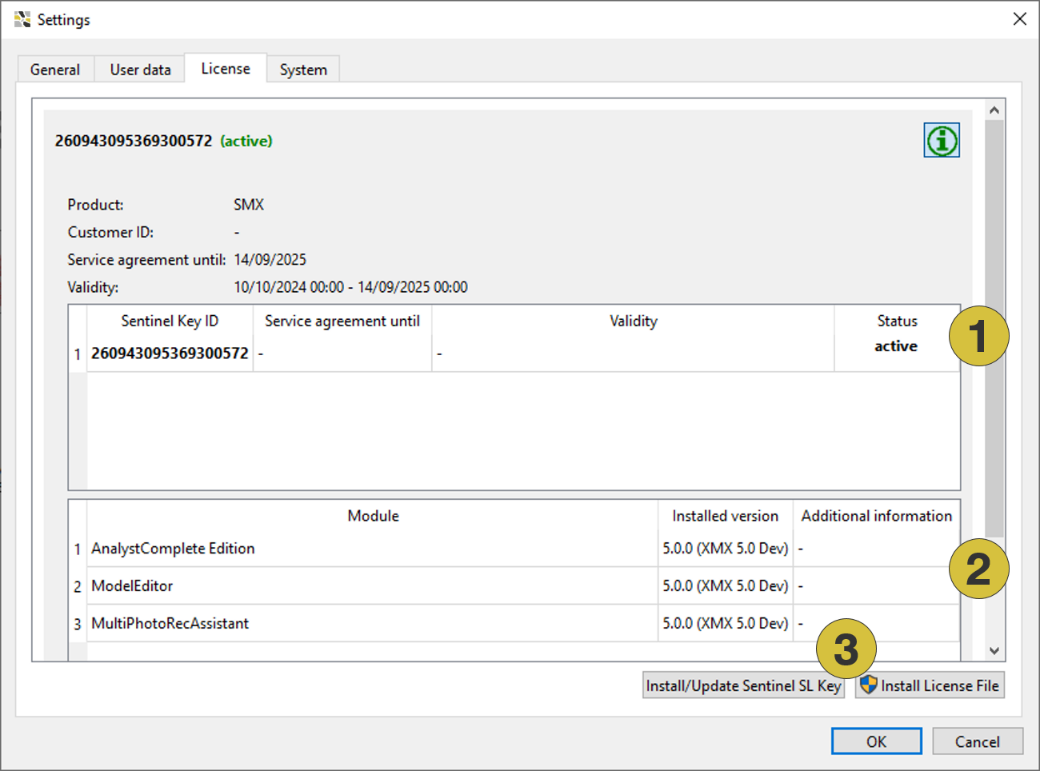
- Sentinel key(s) status
- Installed and licensed software components
- Installation/Update of the Sentinel SL Key and license
Available Sentinel key(s) with and their validity period and the expiry date of the service agreement is listed with the status of the key:
- Active: used by active session
- Available: present and active
- Expired: validity expired
- Unavailable: service agreement not valid
The active and licensed modules with their version number is listed for each key.
A new key and/or license is installed by clicking the button “Install/Update Sentinel SL Key” and “Install License File” respectively. License installation is required in the following cases:
- First installation of the software
- Reinstallation of the software after a new computer set up
- Extension of a service and update license
- Extension of a temporary license
- Installation of additional software components (Add-on)