User Data Settings
The User Data sheet shown below allows the user to install camera calibrations files and provides features for data management.
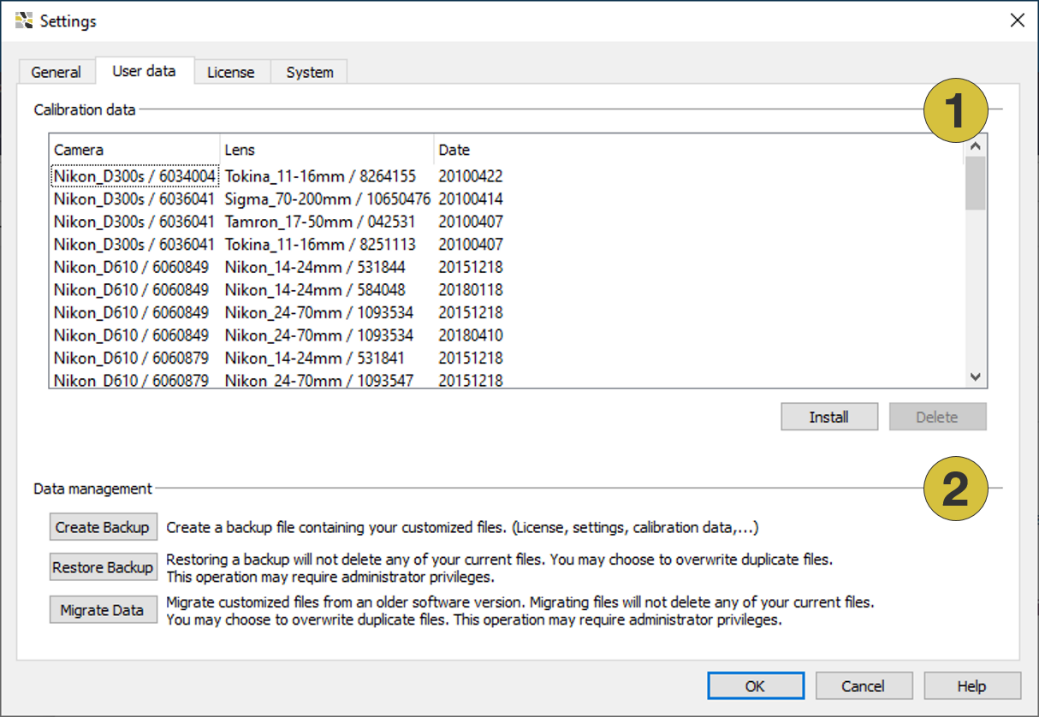
- Install camera calibrations
- Data management
Calibration data
The User Data sheet is used for viewing, adding and removing calibration files to the software. It lists camera calibrations installed on your computer. The camera model, e.g. Nikon D90, with the corresponding serial number is given in the left column. Each camera is calibrated with one or several lenses specified by the lens type, the focal length and the lens serial number. The right column shows the date of calibration. The calibration files are delivered in a “.zip” file format, which can be found on the original FragMetriX CD, the recalibration CD, or on your ftp account. If a specific camera calibration is required, please contact Get Support.
In order to install a camera calibration file choose the “Install” button and specify the folder and name (“.zip”) of the calibration file. After confirmation the camera calibration is installed to the FragMetriX software. In order to remove a camera calibration from the FragMetriX software, click on the calibration entry in the calibration list and choose “Delete”. After confirmation the calibration entry is removed.
Data management
- Create Backup
Creates a backup file (“.zip”) containing the customized files (license, settings, calibration data, …) - Restore Backup
Restores a backup. This operation may require administration privileges. - Migrate Data
Migrate customized files form an older software version. This operation may require administration privileges.