Snap Imported Bolts
Bolts are only accounted for in kinematic computations if they are installed within tolerance to the excavation face and are thus determined to intersect the excavation surface. The Snap Imported Bolts feature helps to snap bolts onto the excavation surface based on a user-defined tolerance. This feature is recommended for use after importing bolts via .csv and bolt head locations are not exactly on the excavation surface. If your model is staged, you can specify which stage to snap the bolts to the excavation surface.
Snap Method
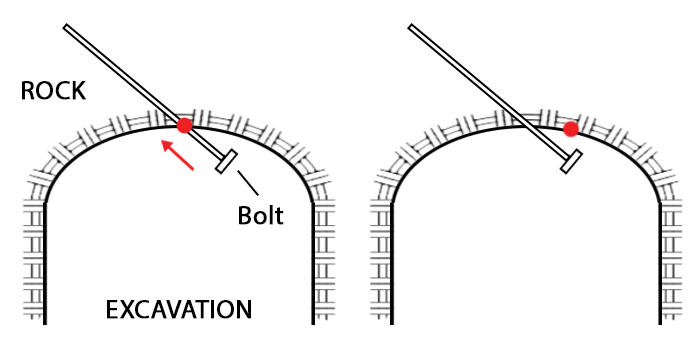
Two (2) snap methods are available:
- Intersection point (in bolt direction) – the bolt would snap to the excavation surface in the direction of its length. This method is preferred for preserving bolt pattern spacing.
- Closest point – the bolt would snap to the closest point on the excavation surface from the bolt head. If there is at least one potential excavation surface, then the bolt would snap to the closest point it finds first.
Snap Tolerance
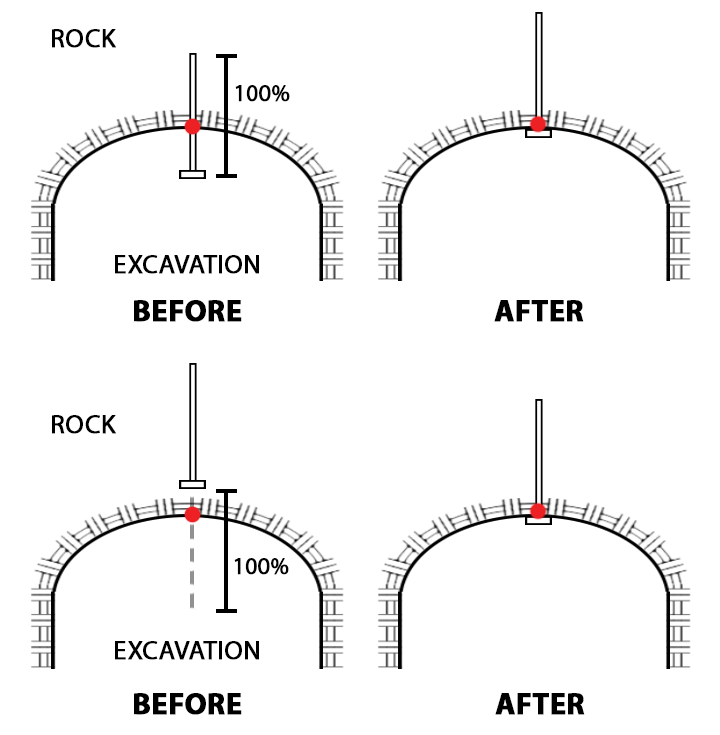
A bolt is snapped to the excavation surface if a snap point can be found within the user defined tolerance, expressed as a percentage of the bolt length and with reference distance from the bolt head. The value must be greater than 0% and less than or equal to 100%. This means that no snap point would be found if 1) the snap method is “Intersection Point” and the bolt is completely inside the excavation, and 2) the snap method is “Closest Point” and the closest point from the bolt head to the excavation surface is greater than 100% the bolt length. If there are different bolt lengths used in the model, then the tolerance is applied to the bolts individually.
Option to Remove Unsnapped Bolts
This is an option to remove bolts that could not be snapped to the excavation surface because they are outside the user defined snap tolerance. The bolts would be removed from the model and would not participate in kinematic computations.
Preview
A preview of the adjusted bolts is available from the 3D viewports. The preview shows the new bolt locations and highlights any bolts that could not be snapped.