Contour Blocks and Contour Excavation
The Contour Blocks feature is a heatmap that shows the areas of the excavation which have blocks of the highest/lowest computed values. The Contour Excavation feature is similar, but only the excavation faces are colored to help interpret results from the point of view of the excavation for underground settings.
The availability of Contour Data depends on the analysis mode. In a Deterministic Analysis, the computed values for each block are unique, whereas for a Probabilistic Analysis, computed values for each block may vary between different sample runs. Therefore, in a Probabilistic Analysis only critical values are reported.
In a Deterministic Analysis, the following data is available:
- Factor of Safety
- Weight
- Volume
- Driving Force
- Resisting Force
- Required Support Pressure
- Failure Depth
- Excavation Face Area
- Failure Iteration
In a Probabilistic Analysis, the following data is available:
- Min. Factor of Safety - minimum factor of safety for all sample runs of a given block
- Max. Weight - maximum block weight for all sample runs of a given block
- Max. Require Support Pressure - maximum required support pressure for all sample runs of a given block
- Max. Failed Depth - maximum failed depth for all sample runs of a given block
- Probability of Failure - sum of all failed samples (FS < Design FS) / total samples for the given block
The blocks contoured can be for All Valid Unit Blocks or for a subset of blocks which only encompass Removable Unit Blocks or Failed Unit Blocks. Contours for unit blocks can be toggled on or off. Contours are always turned on when looking at Combined Blocks, and they are only available when looking at Removable Combined Blocks and Failed Combined Blocks. Contours are not available when looking at Unit and Combined Blocks. See the Block Type and Results Set topic for more information on the different Block Types.
Note that when looking at Contour Excavation, blocks corresponding to an excavation face are visible if they are selected in the Block Information table or if the excavation face is hovered over.
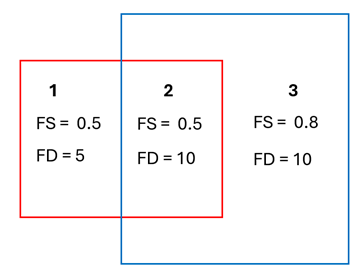
The contours when looking at Combined Blocks are calculated for each Unit Block in the Combined Blocks. In some instances, a Unit Block may be a part of more than one Combined Block (for example, in the figure below, Unit Block #2 is part of the red Combined Block and the blue Combined Block). The contours for each Unit Block in a Combined Block are the most conservative value based on the Combined Blocks it is a part of:
- The lowest Factor of Safety is shown for Deterministic Analysis and the lowest Min. Factor of Safety is shown for Probabilistic Analysis.
- The largest Weight, Volume, Driving Force, Resisting Force, Required Support Pressure, Failure Depth, Slope Face Area are shown for Deterministic Analysis.
- The largest Max. Weight, Max. Required Support Pressure, Max. Failed Depth, and Probability of Failure are shown for Probabilistic Analysis.