Result Details
The Result Details provide a complete summary of the Wedge, Planar and Toppling model input data and analysis results.
To view the Result Details:
- Select Home > Analysis Window > Wedge
 , Planar
  or Toppling
  to open a single-window view of the desired model.
 - Navigate to the right side of the analysis window.
- Select the Result Details tab to open the table.
- This will open a pane containing information regarding the analysis windows.
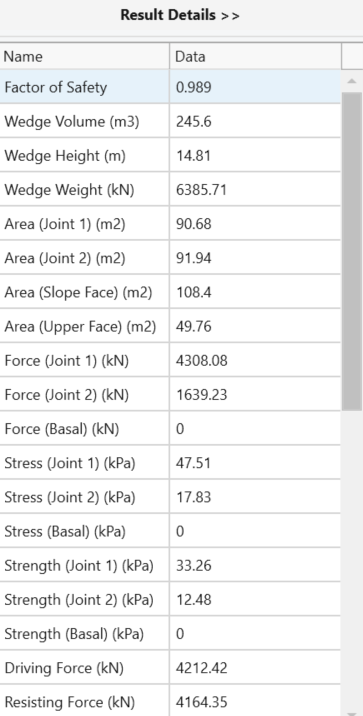
Wedge Result Details
The following information is available in the Wedge Analysis Results Details tab:
- Factor of Safety
- Wedge Volume
- Wedge Height
- Wedge Weight
- Area (Joint 1)
- Area (Joint 2)
- Area (Slope Face)
- Area (Upper Face)
- Slope Height
- Slope Angle
- Unit Weight
- Bench Width
- Backbreak Distance
- Force (Joint 1)
- Force (Joint 2)
- Force (Basal)
- Stress (Joint 1)
- Stress (Joint 2)
- Stress (Basal)
- Strength (Joint 1)
- Strength (Joint 2)
- Strength (Basal)
- Driving Force
- Resisting Force
- Required Support Pressure
- Sliding Direction (Plunge)
- Sliding Direction (Trend)
- Line of Intersection (Plunge)
- Line of Intersection (Trend)
- Line of Intersection (Length)
- Trace Length (Joint 1)
- Trace Length (Joint 2)
- Persistence (Joint 1)
- Persistence (Joint 2)
- Intersection Angle Slope Face (J1/J2)
- Intersection Angle Upper Face (J1/J2)
- Intersection Angle Slope Face (J1/Crest)
- Intersection Angle Upper Face (J1/Crest)
- Intersection Angle Slope Face (J2/Crest)
- Intersection Angle Upper Face (J2/Crest)
- Joint 1 Info
- Joint 2 Info
- Basal Joint Info
Planar Result Details
The following information is available in the Planar Analysis Result Details tab:
- Factor of Safety
- Wedge Volume
- Wedge Weight
- Wedge Height
- Slope Height
- Area (Slope Face)
- Area (Upper Face)
- Unit Weight
- Slope Angle
- Failure Plane Angle
- Upper Face Angle
- Tension Crack Angle
- Sliding Direction (Trend)
- Sliding Direction (Plunge)
- Waviness
- Bench Width
- Backbreak Distance
- Failure Plane Length
- Slope Length
- Tension Crack Length
- Normal Force
- Normal Stress
- Shear Strength
- Driving Force
- Resisting Force
- Required Support Pressure
- Joint Info
Toppling Result Details
The following information is available in the Toppling Analysis Result Details tab:
- Factor of Safety
- ∑ Sliding Block Volume
- ∑ Toppling Block Volume
- ∑ Stable Block Volume
- ∑ Failing Block Volume
- ∑ Block Volume
- ∑ Failing Block Weight
- ∑ Block Weight
- Slope Height
- Slope Angle
- Unit Weight
- Overall Base Inclination
- Joint Info
Filter Options
To access filter options in the Wedge, Planar or Toppling Result Details Tab:
- Hover over either the Name or Data column header.
- A filter icon will appear beside the label. Click on the filter icon to open the Filter Options.
The following options are available filter options for the Name column:
- Filter Rules (first entry):
- A list of terms that add a characteristic to a selected value.
- Filter Rules (second entry)
- A list of items from the Name column, can also be found in the Filter Values tab.
The following options are available filter options for the Data column:
- Filter Rules (first entry):
- A list of terms that add a characteristic to a selected value.
- Filter Rules (second entry)
- A list of items from the Data column, can also be found in the Filter Values tab.