Advanced Filtering
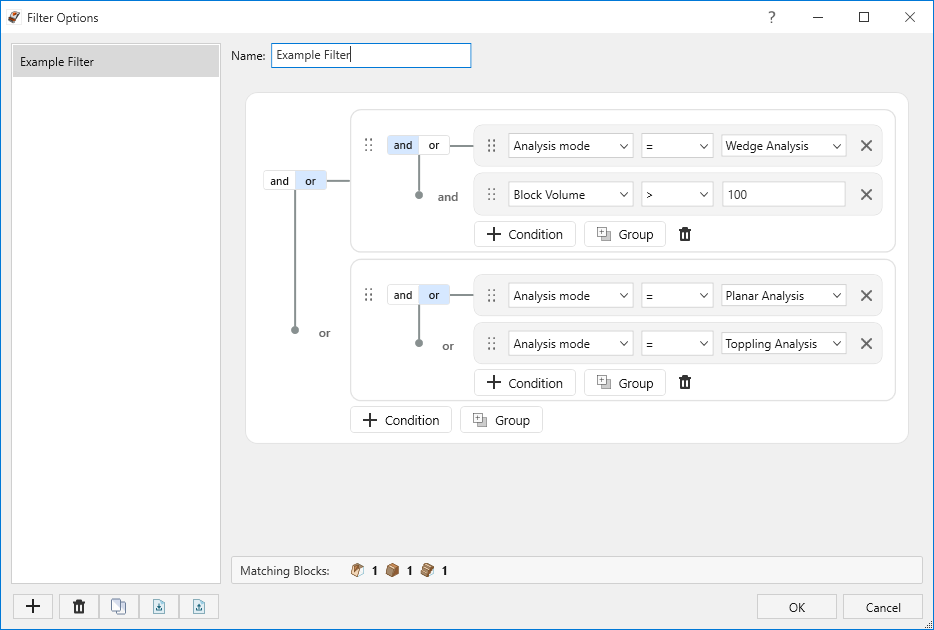
The Advanced Filtering (Results Filter) feature lets you define named filter criteria and apply them to block results. Use Advanced Filtering when you want to focus the Results Grid, charts, stereonet poles, exports, and related displays on subsets of blocks that meet criteria such as Factor of Safety range, block volume, analysis mode, or a combination of various parameters specific to your project.
Filters are project-based. Named filter presets and the currently applied filter are saved with the .rocslope2 project file. Presets can also be imported and exported as stand-alone filter files for reuse in other models.
To access Advanced Filtering
- Select Results > Filter > Filter Options

- In the Filter Options dialog create or select a filter preset, then define criteria in the Advanced Filter pane.
- Apply a preset from the Selected Filter ribbon combo, or apply from within the dialog.
- To clear filtering, select Results > Filter > Clear
 , or choose <No Filter> from the Selected Filter list.
 - The lowest Factor of Safety and the corresponding Block ID and Geometry will again be displayed at each analysis pane for the corresponding analysis method after filter is cleared.
Selected Filter chooses the active filter for this project. The status bar shows Filter applied: name when a filter is applied. Charts can show a matching footnote.
Filter presets and import / export
- Each project can store multiple named filter presets; only one can be applied at a time.
- Use Import / Export in the Filter Options dialog to share presets between projects. Exported files use the *.rocslope2filter format (one preset per file).
What filtering affects
When a results filter is applied, only matching blocks are used for:
- Results Grid listing and navigation of the current block set
- 2D and 3D model views of the selected / displayed sample blocks
- Histogram, Scatter, and Cumulative plots (sample-based result plots)
- Stereonet display of result poles / related result graphics driven from the computed result set
- Report Generator tables and deterministic Factor of Safety content drawn from the current filtered result set
- Exported Results Grid data (CSV / Excel)
What filtering does not affect
Probability of Failure (PF), and related probability summaries such as Probability of Sliding / Probability of Occurrence when those values are computed for the full probabilistic run, remain based on the unfiltered computed sample set. Applying or changing a results filter does not recalculate PF.
- Bench Design chart computations are separate from the results filter.
- Results filters do not change input geometry, joint data, or re-run the engine.
This is different from the Failure Mode Filter (Analysis), which excludes failure modes as part of the wedge and planar analysis outcome set and can change Probability of Failure. See the Failure Mode Filter topic for details.
Assumptions and behaviour
- Filtering is applied to the set of blocks that were formed and stored when the model was last successfully computed.
- If no blocks were formed before filtering, the analysis reports No blocks formed (same as when no kinematically valid blocks exist).
- If blocks exist in the unfiltered deterministic analysis results but none satisfy the applied filter, the analysis displays All blocks filtered out (deterministic Factor of Safety display / related FS messaging). This is distinct from No blocks formed.
- If blocks exist in the unfiltered probabilistic analysis results none satisfy the applied filter, the analysis displays Probability of Failure (probabilistic Probability of Failure display / related PoF messaging) but no blocks will be displayed.
- Criteria that use a field not applicable to a given analysis method do not match results of that method (see Filter criteria below).
- Clearing the applied filter restores the full computed result set for views and exports without recomputing.
Filter criteria
Criteria are built with the Advanced Filter editor. Available fields and which analysis methods they apply to are listed below.
All analysis methods (Wedge, Planar, Toppling)
- Analysis mode
- Factor of Safety
- Block Volume
- Block Weight
- Block ID
- Backbreak Distance
Wedge and Planar
- Resisting Force; Driving Force; Required Support Pressure
- Block Height
- Area Slope Face; Area Upper Face; Area Joint 1; Area Tension Crack
- Sliding Direction (Plunge); Sliding Direction (Trend)
- Force / Stress / Strength for Joint 1, Joint 2, and Basal (where produced for that mode)
Wedge only
- Area Joint 2
- Area Basal
- Line of Intersection (Plunge); Line of Intersection (Trend); Line of Intersection (Length)
Toppling only
- ∑ Sliding Block Vol.
- ∑ Toppling Block Vol.
- ∑ Stable Block Vol.
- ∑ Failing Block Vol.
- ∑ Flexural Bending Block Vol.
- ∑ Shearing Block Vol.
- ∑ Failing Block Wt.
Criteria notes
Deterministic and Probabilistic: the same criteria fields apply. In Probabilistic analysis, filter conditions select among stored samples for display and sample-based charts; they DO NOT change reported Probability of Failure for the full run.