Scripting Comes to RS3: Automate, Customize, and Accelerate Your 3D Modelling
- Dr. Reginald Hammah, Chief Scientific Officer at Rocscience
We are proud to announce the first release of scripting in RS3. This feature empowers you to automate tasks, reliably reproduce models, and tailor workflows for 3D finite element modelling. Whether you're designing open pits, sequencing underground stopes, or analyzing tunnel support, scripting in RS3 helps you work smarter.
Why Scripting Matters
Geotechnical projects are more complex. Models are larger, construction sequences have more stages, and parametric studies must be rerun. Manually building and post-processing models is tedious and time-consuming. Small inconsistencies can easily creep in.
With scripting, RS3 users can now:
- Automate repetitive model-building tasks
- Build models directly from CSV files, spreadsheets, or databases
- Standardize workflows across projects and teams
- Extract and visualize results their way, and
- Plug RS3 into broader digital engineering workflows
To highlight scripting in RS3, we are launching a three-part series, with each article covering a specific real-world application: open pit mining, underground mining, and tunnelling.
Part 1 – Automating Open Pit Model Creation
The first article focuses on modelling open-pit excavations. With a single script, engineers can:
- Define excavation sequences directly from bench elevations
- Generate construction stages automatically from these elevations
- Apply appropriate boundary conditions, and
- Run the analysis
all without any manual intervention.
Models that once took hours to set up can now be built, staged, and computed in minutes. For pits with many benches and pushbacks, the time savings and drop in human error are game-changing.
Let RS3 and Python Do the Work: Generating Scripts from Natural Engineering Language
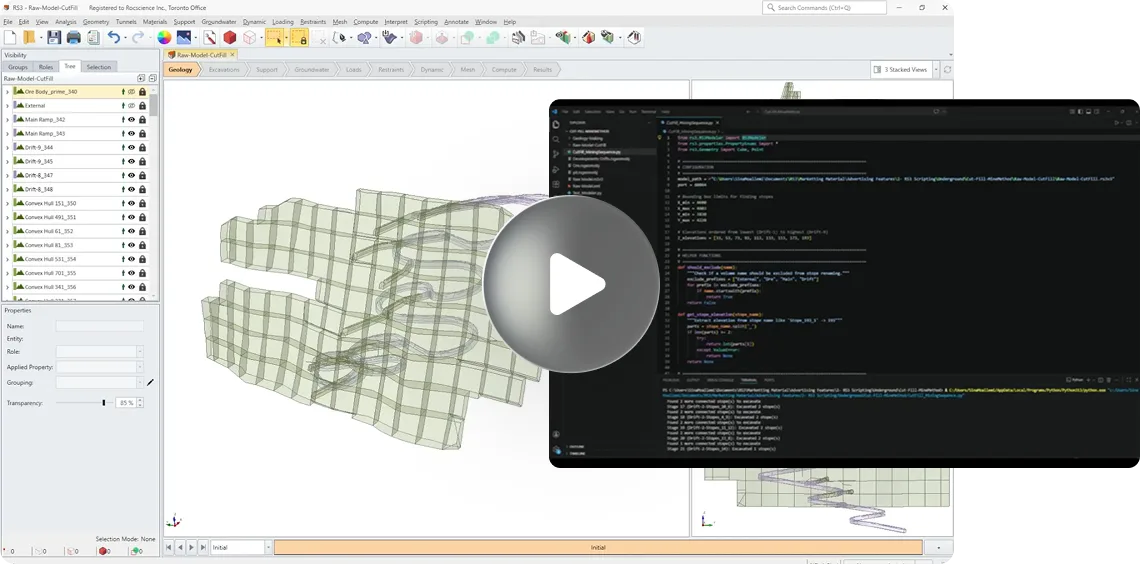
To get us started, however, we will highlight a simple underground cut-and-fill mining example in this article. One of the most powerful aspects of the new RS3 scripting module is how easy it is to go from an idea in natural engineering (plain) language to a working Python script that RS3 can execute. Instead of hand‑coding every step, you can describe the workflow you want, let an AI code assistant generate the script, and then run it directly inside RS3.
In a recent underground cut‑and‑fill example, we used the Cursor AI coding assistant to do exactly this. The only “input” Cursor received was a natural‑language description of the task:
- Open an existing RS3 model from a specified folder.
- Find all stopes at a set of known elevations and rename them based on elevation, while ignoring volumes whose names start with “External”, “Ore”, “Main”, or “Drift”.
- Create a new stage called “RampExcavation” and excavate all volumes named “Main Ramp”.
- Loop through a series of drifts and stopes: for each drift, create the excavation stage, find connected, non‑excavated stopes at the same elevation, excavate them in sequence, and finally assign a “BackFill” material to all stopes in that elevation stage.
Cursor translated this description into a complete Python script using the RS3 scripting API, with the correct calls to open the model, create stages, excavate volumes, detect connectivity, and assign materials. Once the script was generated, we simply loaded it into RS3’s scripting module and ran it. RS3 then followed the instructions step by step: renaming stopes, building stages, excavating drifts and stopes, and backfilling them automatically.
To see this in action, you can watch a short screen‑capture video that shows RS3 reading the Python file and executing the full excavation and backfill sequence.
What You Can Control with RS3 Scripting Today
With this release, you drive every step of the modelling workflow from a script:
- Build geometry and set up excavation sequences
- Create and manage construction stages
- Apply boundary conditions
- Assign materials and support
- Run the analysis
- Extract results and create your own plots
Looking Ahead: What’s Next in the Series
While this article focused on how scripting can automate underground excavation and backfill workflows from natural-language instructions, the next parts of the series will explore how far this flexibility can extend across mining and tunnelling applications.
Part 2 – From Mine Planning Data to a Fully Staged 3D Model
The next article will demonstrate how RS3 scripting can connect mine planning workflows directly to geomechanical simulation. In many underground mining operations, extraction and backfill schedules are managed in spreadsheets maintained by planning teams. With scripting, those schedules can become direct inputs to the numerical model.
Using a CSV file containing:
- Stope names
- Excavation stage numbers
- Backfill stage numbers
RS3 will automatically generate staged excavation and backfill sequences directly from the planning data. When schedules change, engineers will be able to rerun the script and regenerate updated models within minutes rather than manually rebuilding staging sequences.
The article will also demonstrate how this workflow can reduce setup effort while improving consistency between mine planning and numerical analysis.
Part 3 – Interactive Tunnel Support Design Through Custom Post-Processing
The third article will focus on extending RS3 post-processing workflows through scripting-driven design tools.
Using a tunnelling model, scripts will extract liner forces and feed them into a custom interactive interface for support assessment. Engineers will be able to:
- Move a section interactively along the tunnel alignment
- View shear forces and bending moments for that section in 2D
- See support capacity envelopes update dynamically in real time
Rather than relying only on standard result plots, this workflow will demonstrate how RS3 scripting can support project-specific design dashboards tailored to engineering decision-making.
The Roadmap Ahead
This release marks the beginning of a more flexible and programmable future for RS3. Scripting opens the door to advanced workflows including parametric studies, probabilistic analysis, design optimization, and AI-assisted modelling automation.
The scripting API will continue to expand, with additional capabilities and real-world workflow examples to be shared in future releases.
Reach out to the RS3 team to learn how scripting can accelerate your next project and follow the upcoming articles in this series to see RS3 scripting applied across real engineering workflows.