Automating Back Analysis in RS2: A Scalable Workflow for Model Calibration
- Alireza Azami,
Back analysis is where geotechnical models stop being purely predictive and start being confronted by observed behaviour.
In deep excavations, that test is unforgiving. Small, defensible changes in soil stiffness, strength, or support behaviour can produce disproportionately large differences in wall deflections and ground movements — differences that only become visible once construction is underway and monitoring data becomes available.
Reconciling numerical predictions with measured behaviour is therefore not optional. Yet doing so through manual, one-model-at-a-time iteration does not scale. When hundreds or thousands of parameter combinations must be evaluated to calibrate a design, the challenge is no longer formulation; it is practical feasibility.
This article presents an automated back-analysis workflow built around RS2, where scripting, parallel computation, and high-performance computing enable more than 4,500 finite element simulations to be generated, solved, and systematically compared against field data — transforming back analysis from an ad hoc exercise into a systematic, data-driven process suitable for real project timelines.
The Challenge: Back Analysis at Scale
Traditional back analysis in finite element modelling typically involves:
- Manual duplication of models.
- Adjusting soil or rock parameters one set at a time.
- Re-running analyses sequentially.
- Extracting results individually.
- Comparing outcomes with monitoring data by hand.
For a small number of models, this approach is manageable. For hundreds, or thousands, it quickly becomes a bottleneck.
In the case discussed here, over 4,500 RS2 models were considered to fully explore combinations of material parameters and construction assumptions relevant to a deep excavation. Executed manually, this effort would be time-prohibitive, difficult to reproduce, and highly susceptible to inconsistency and human/user errors.
Overview of the Automated Workflow
The workflow is structured as a closed, repeatable loop:
Model Generation → Computation → Results Extraction → Calibration
Each step is automated using RS2 scripting, coordinated externally through Python, allowing the entire process to scale without sacrificing control or transparency.
Step 1: Automated Model Generation Using RS2 Scripting
RS2 provides scripting access to the Modeler, allowing users to programmatically define and modify the material properties and support parameters (linear, bolt, pile), with access to the calculated results.
In this workflow, a Python-based control script systematically generated thousands of RS2 model files, each representing a unique combination of selected soil parameters. These variations were defined explicitly in code, ensuring:
- Consistent geometry and staging across all models.
- Controlled, traceable parameter changes.
- Complete reproducibility of the model set.
To reduce setup time, multiple instances of RS2 Modeler were launched in parallel — an important capability that enables users to distribute model generation workload across available computational resources. Each instance handled a subset of models, allowing model generation to proceed concurrently rather than sequentially.

Engineering value:
This approach eliminates repetitive manual setup while preserving full engineering oversight. Every generated model remains a standard RS2 file, fully reviewable, auditable, and interpretable using familiar tools.
Note: While geometry definition and meshing remain Modeler-driven tasks, scripting enables large-scale, consistent variation of material properties, support systems, and construction stages — without altering the underlying finite element formulation.
Step 2: Parallel Computation Using High-Performance Computing
Once generated, the models were solved using high-performance computing (HPC).
Rather than running analyses one at a time on a single workstation, the workflow distributed model computations across available computing resources, enabling multiple finite element analyses to run in parallel.
Performance in Context:
- 4,500 RS2 models completed in approximately 5 hours
- Equivalent sequential execution on a single workstation would typically require several days to weeks, depending on mesh density, number of stages, and constitutive model complexity.
Even under conservative assumptions, fully sequential execution would take weeks’ worth of time if done manually.
Engineering value:
HPC does not change the physics of the problem — it changes what is feasible within a project schedule. Parameter studies and back analyses that were once impractical become operationally realistic.
Step 3: Automated Results Extraction Using RS2 Interpreter
After computation, the next challenge is post-processing. Extracting results manually from thousands of models is often more time-consuming than solving them.
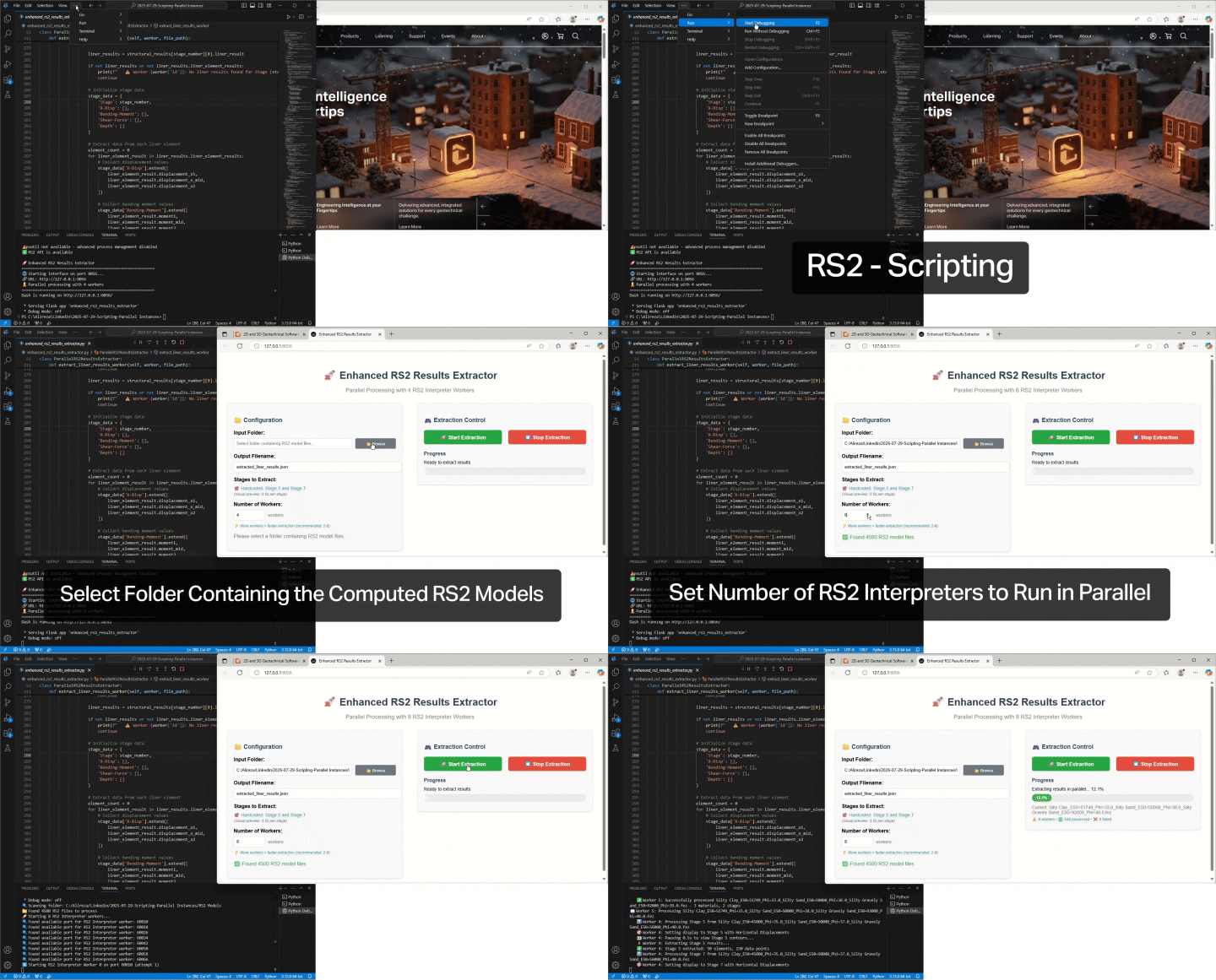
Using RS2 Interpreter scripting, this workflow automated the extraction of key response quantities, such as:
- Displacements at any desired location (e.g. at instrumented monitoring locations).
- Wall deflections.
- Stress and strain measures.
- Pore pressure responses.
As with model generation, multiple instances of RS2 Interpreter were run in parallel, each processing a subset of completed models. Extracted results were written to structured data files suitable for external comparison and visualization.
Engineering value:
Automated extraction ensures methodological consistency. The same quantities are extracted, in the same way, from every model — eliminating subjective interpretation drift and accidental omissions, drastically reducing the post-processing time.
Step 4: Calibration Against Monitoring Data
The extracted numerical results were then compared systematically against field monitoring data from the excavation.
Rather than visually inspecting plots one model at a time, the workflow enabled:
- Bulk plotting of results from thousands of simulations.
- Quantitative comparison between computed and measured responses.
- Identification of parameter sets that best reproduce observed behaviour.
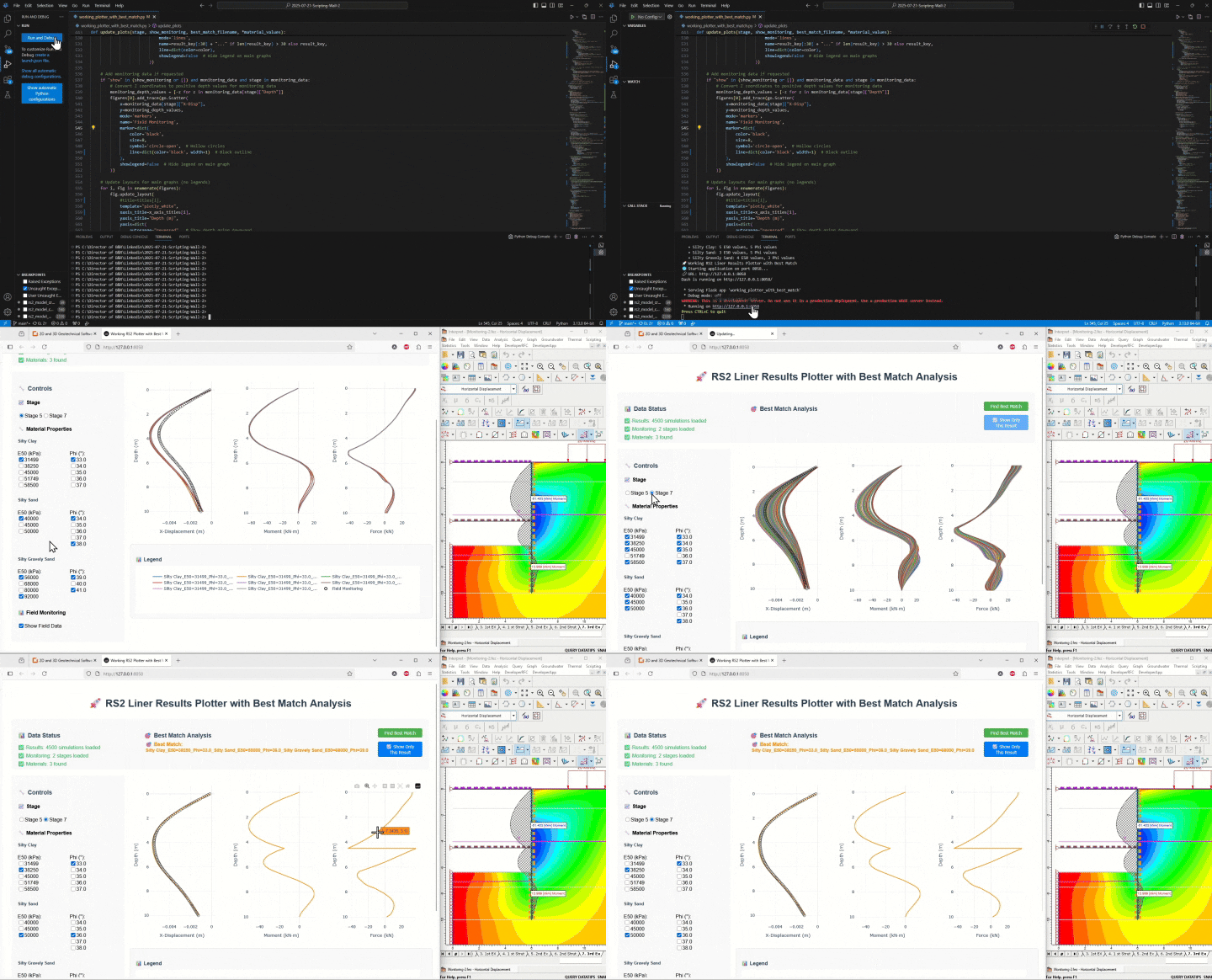
By plotting results from thousands of computed RS2 models simultaneously, engineers can identify the parameter combinations and the appropriate ranges that best match observed performance and then, use those matches to systematically calibrate material properties.
At this scale, back analysis becomes a structured search problem, where thousands of simulations are evaluated to identify parameter combinations that minimize discrepancy between prediction and observation.
Engineering value:
Calibration is no longer based on a small number of trial-and-error runs. It is informed by a broad, explicit exploration of parameter space, increasing confidence in selected material properties and design assumptions.
Step 5: Python as the Orchestrator
RS2 exposes its modelling and interpretation functionality through a Python scripting interface, allowing external workflows to automate and coordinate large-scale analyses without modifying the finite element engine itself.
Within this framework, Python manages:
- Parameter definition
- Model generation logic
- Parallel execution control
- Data aggregation and plotting
This external control layer provides workflow flexibility while preserving RS2’s role as the authoritative numerical engine. Engineers remain free to customize workflows, interfaces, and evaluation criteria based on project needs.
Engineering value:
Python acts as infrastructure, not a black box. The numerical modelling remains transparent, while automation handles scale and repetition.
Why This Matters for Engineering Practice
This automated back-analysis workflow demonstrates how RS2 can be extended beyond isolated project models into large-scale, data-driven investigations.
Key outcomes include:
- Substantial reduction in manual effort
- Faster, more defensible calibration studies
- Improved confidence in selected material parameters
- Fully reproducible and auditable modelling processes
Most importantly, it allows engineers to focus on interpreting behaviour and making decisions, rather than managing files and rerunning models.
Closing Thought
In geotechnical engineering, the subsurface is never observed directly; only inferred through response. Confidence, therefore, is not the result of a single well-behaved model, but of iteration carried out rigorously, consistently, and at meaningful scale.
By making large-scale back analysis practical, scripting in Rocscience tools allows engineers to move beyond isolated trial models and toward systematic calibration against real monitoring data. The value lies not in automation itself, but in what it enables: clearer insight into ground behaviour, more defensible material parameters, and design decisions grounded in observation rather than assumption.
When iteration is transparent and reproducible, engineering judgment is strengthened, allowing teams to focus less on managing models and more on understanding behaviour, refining support strategies, and delivering safer, more reliable excavations.
Explore Large-Scale Back Analysis with RS2 Scripting
Learn how RS2 scripting supports reproducible, large-scale back analysis.
Star your free trial today