Import from CSV
To import Measured Joints data to the Define Measured Joints dialog from a CSV file:
- Select Import CSV
 from the Define Measured Joints dialog.
 - In the Open file dialog, select a delimited text file (.csv or .txt) and click Open to load it.
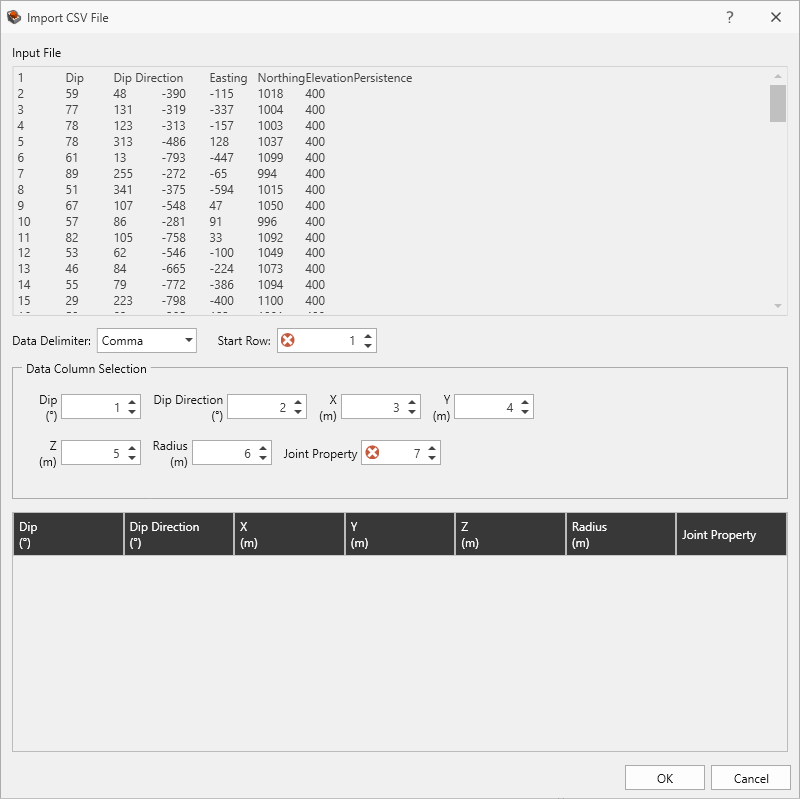
- The Import CSV File dialog shows a preview of the file and allows the user to specify how the data is imported.
- Set the Data Delimiter (e.g., Comma, Semi-Colon, Space, Tab, Pipe, or All).
- Set the Start Row. Any data from rows before the start row are ignored.
- Set the Data Column Selection for each of the expected columns by setting the column index.
The file must contain at minimum, the predefined columns. All additional columns are appended to the right of the predefined columns.
- Click OK to import the data.